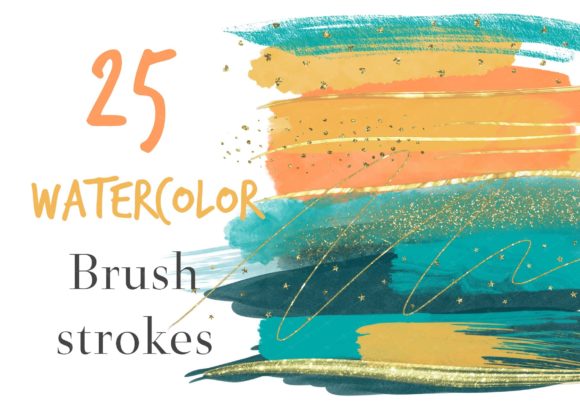
Green Watercolor Brushstrokes Clipart: Elevate Your Creative Projects with Premium Artistic Flair
In the world of digital design, finding assets that balance organic authenticity with professional polish can be a challenge. Many designers and crafters struggle to find elements that feel hand-crafted without the time commitment of painting them from scratch. This is where Green Watercolor Brushstrokes Clipart becomes an invaluable resource. By combining the fluid, unpredictable beauty of watercolor with the precision of high-resolution digital files, you gain access to a versatile toolkit that enhances virtually any visual project.
This guide explores how incorporating premium green and orange watercolor brushstrokes, accented with gold glitter, can transform your designs. Whether you are creating wall art, designing merchandise, or planning a personal organizer, understanding how to leverage these specific artistic elements will help you achieve a cohesive and stunning aesthetic.
The Appeal of Organic Digital Assets
Why choose watercolor brushstrokes over solid vector shapes or generic clipart? The primary reason lies in texture and emotion. Watercolor has long been associated with creativity, softness, and human touch. When used in digital formats, it adds depth and warmth that flat colors often lack. Specifically, Green Watercolor Brushstrokes Clipart offers a calming, natural vibe that resonates with themes of growth, nature, wellness, and freshness.
However, not all watercolor assets are created equal. Low-quality images often appear pixelated or have harsh edges when scaled up. The solution lies in using premium sets like the one described here, which features 25 original hand-painted brush strokes. These assets come in various sizes and include both standard watercolor textures and decorative gold glitter accents. This combination allows for dynamic contrast—pairing the soft, translucent look of green washes with the sharp, luxurious shine of gold foil effects.
What’s Inside the Premium Set?
To make the most of this asset pack, it is important to understand exactly what you are getting. You receive a single ZIP folder containing 25 PNG files. Breaking this down:
- 16 Watercolor Brush Strokes: These provide the foundational texture. They come in various sizes, allowing you to layer them or use them as standalone background elements.
- 9 Decorative Gold Glitters: These PNGs feature transparent backgrounds, making them perfect for overlaying on top of other designs to create a "gold leaf" or "glitter" effect without altering the underlying image structure.
Every file is provided at 300dpi high resolution with a transparent background. This technical specification is crucial for professionals because it ensures that when you place these brushstrokes into your software, there are no ugly white boxes around them. They blend seamlessly into your layout, regardless of the background color you choose.
Practical Applications for Various Creators
The versatility of Green Watercolor Brushstrokes Clipart means it serves multiple audiences differently. Here is how different users can apply these resources to solve common design problems.
For Small Business Owners and Merchandise Designers
If you sell physical products, visual appeal is everything. These brushstrokes are ideal for printing on mugs, notebooks, clothes, and keychains. The high-resolution nature of the files ensures that the details remain crisp even when printed on larger surfaces. For example, you might use a large green watercolor stroke as a background for a quote on a t-shirt, then overlay a small gold glitter accent near the text to draw the eye. The transparency of the PNG files makes this layering process effortless in any software compatible with PNG formats.
For Planners and Stationery Designers
Planners and bullet journals thrive on organization mixed with creativity. Using green watercolor strokes can break up dense text and add visual interest to headers or section dividers. The organic shape of the brushstrokes helps soften the rigid lines typical of grid-based planners. Additionally, the gold glitter elements can be used sparingly to highlight important dates or achievements within a planner template, adding a touch of luxury to everyday planning.
For Graphic Designers Creating Brand Identity
Brands looking to convey eco-friendliness, health, or tranquility often benefit from green palettes. Instead of using stock photos, designers can use these brushstrokes to create custom logos or brand patterns. The variety of sizes allows for consistent branding across different mediums—from social media profile pictures to large banner ads. The inclusion of orange watercolor options (as part of the broader set) also provides complementary color opportunities, leveraging the classic green-and-orange contrast to create vibrant, energetic designs.
Overcoming Common Design Challenges
One common challenge in digital design is achieving a "handmade" look that doesn't appear messy or unprofessional. Raw watercolor paintings can sometimes look too chaotic for modern web design. By using pre-made, high-quality brushstroke clipart, you control the placement and scale. You decide where the paint drips and where it ends. This control allows you to maintain brand consistency while still enjoying the aesthetic benefits of traditional art.
Another challenge is color accuracy. It is worth noting that different computer monitors will display color differently. A bright lime green on one screen may appear more olive on another. To mitigate this, always view your final designs in print proofs or on multiple devices if possible. However, the transparency of the PNG files ensures that you can adjust the opacity and blending modes in your editing software to fine-tune the color interaction with your chosen background.
Implementation Tips for Best Results
To get the most out of your Green Watercolor Brushstrokes Clipart, consider these practical tips:
- Layering is Key: Don’t just place one brushstroke. Layer two or three different sizes and opacities to create depth. Use the smaller strokes for highlights and the larger ones for base coverage.
- Contrast with Typography: Since watercolors are often light and translucent, ensure your text has sufficient contrast. Dark fonts work well over light green washes, while white text pops against darker, saturated strokes.
- Use Gold Sparingly: The gold glitter elements are powerful attention-grabbers. Use them to accentuate key words or borders rather than filling entire spaces. Too much glitter can distract from the main message.
- Explore Complementary Colors: While the focus is on green, remember that the set includes orange tones. Pairing green and orange creates a vibrant, autumnal, or tropical feel depending on the shades used. This flexibility allows for seasonal adaptations of your designs.
Conclusion
Whether you are a seasoned graphic designer or a hobbyist looking to improve your DIY projects, having access to high-quality Green Watercolor Brushstrokes Clipart is a game-changer. The combination of 16 varied watercolor strokes and 9 gold glitter accents in a 300dpi transparent PNG format provides endless possibilities for creative expression.
By integrating these organic elements into your work, you move beyond sterile digital templates and inject life, texture, and personality into your creations. From wall art that brings warmth to a room, to branded merchandise that stands out on shelves, these assets offer a simple yet effective way to elevate your visual communication. Enjoy your art project, and let the fluidity of watercolor inspire your next big idea.