Watercolor Cute Safari Animals: A Guide to High-Quality Digital Art for Your Projects
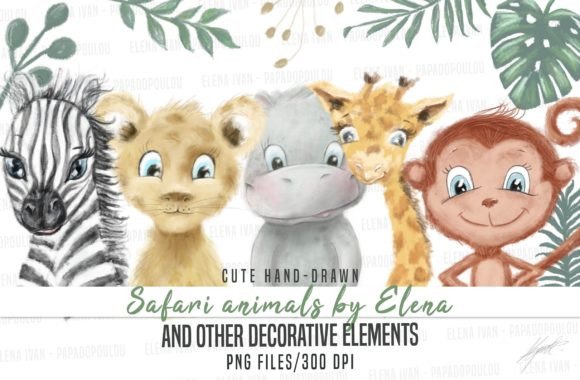
When you are looking to add a touch of whimsy and natural beauty to your creative projects, Watercolor Cute Safari Animals offers a delightful solution. This collection is not just a set of images; it is a curated library designed to bring life to invitations, planner stickers, notebook covers, and even fabric designs. Whether you are a seasoned graphic designer or a hobbyist creating handmade goods for a small business, the appeal lies in the soft, organic texture of watercolor combined with the playful charm of jungle wildlife.
The core value of this resource is its versatility. You receive 33 separated files, each rendered in high-resolution PNG format at 300dpi. The dimensions are approximately 12x12 inches (3600 x 3600 pixels), ensuring that every detail remains crisp whether you are printing a large poster or scaling down an element for a tiny digital sticker. However, simply having access to these assets is only half the battle. To truly maximize their potential and avoid common pitfalls that can ruin a professional-looking final product, it is essential to understand how to handle them correctly.
Understanding the Format and Resolution
One of the most critical aspects of working with digital art is respecting the original resolution. These files are provided as high-resolution PNGs, which means they contain transparent backgrounds and retain their quality without the white boxes often seen in lower-quality downloads. The 300dpi standard is the industry benchmark for print quality, meaning your output will be sharp and clear on paper, unlike screen-only graphics that look pixelated when printed.
Watercolor Cute Safari Animals includes more than just the creatures themselves. The collection features decorative elements like leaves, flowers, branches, hats, bows, sunglasses, and ready-dressed monkeys. Having these separate files allows for immense creativity. You are not limited to pre-made scenes; instead, you can construct your own unique compositions by mixing and matching these elements.
Common Mistakes When Using Digital Assets
Even with high-quality files, many creators make errors that degrade the visual impact of their work. The most frequent mistake involves resizing elements incorrectly. It is tempting to take a small accessory, such as a pair of sunglasses, and stretch it out to cover a larger area of your design. While this might seem like a quick fix, it leads to significant loss of detail and a blurry, unprofessional appearance.
Conversely, enlarging the main animal subjects to fit a specific layout is another error to avoid. If you take a 12x12 inch image and scale it up significantly, the watercolor edges will become pixelated, and the fine brushstrokes that give the art its character will disappear. Instead of making the file larger, the correct approach is to use the smaller elements to enhance the scene without altering the integrity of the primary subject.
Another overlooked detail is the lack of planning before downloading or purchasing. Many users assume that because a file is "high resolution," it can be used for any purpose without adjustment. However, if you intend to use these images for sublimation on tote bags or wrapping paper, you must consider the color profile and the background transparency. While PNGs are excellent for transparency, failing to check the specific requirements of your printer or software can lead to wasted time and materials.
The Importance of Scaling Down
To maintain the highest quality, always prioritize scaling down rather than scaling up. For example, if you wish to place sunglasses on a giraffe, do not enlarge the giraffe to fit the glasses. Instead, reduce the size of the sunglasses until they fit proportionally on the animal's face. This ensures that the delicate details of both the watercolor wash and the accessory remain visible.
This principle applies to all elements in the collection. If you are creating a planner sticker, you might want to combine a monkey with a hat and some foliage. By keeping the individual elements at their native size or reducing them, you preserve the sharpness of the lines and the softness of the colors. Enlarging any part of the image beyond its intended scope will result in a muddy, low-quality finish that detracts from the overall aesthetic.
Evaluating Your Needs Before You Create
Before diving into your project, take a moment to evaluate what you actually need from Watercolor Cute Safari Animals. Are you designing a wedding invitation where a subtle, elegant touch is required? Or perhaps you are making fun birthday cards for children where bold, colorful characters are better suited? The flexibility of the 33 separate files allows you to tailor the design to your specific audience.
Consider the end-use of your creation. If you are producing physical products like fabric or prints, ensure your design software supports the 300dpi requirement. Digital papers and wrapping paper benefit greatly from the high resolution, allowing for seamless tiling without visible gaps or blurriness. On the other hand, for social media posts or website headers, you may not need the full 3600 x 3600 pixel count, but starting with the high-res version gives you the freedom to crop and resize later without losing quality.
Maximizing Creativity with Decorative Elements
The true magic of this collection lies in the decorative extras. Hats, bows, and sunglasses add personality and narrative to the animals. A simple lion becomes a party-goer with a bow tie; a giraffe becomes stylish with sunglasses. However, remember that these elements are meant to complement, not overpower. Use them sparingly to create balance in your composition.
For educators and bloggers, these images can be powerful tools for engagement. Creating worksheets, storybook illustrations, or blog headers with Watercolor Cute Safari Animals can make learning materials more inviting. Just ensure that you respect the aspect ratios and do not distort the shapes of the animals or objects when arranging them on a page.
Practical Tips for Success
- Check File Integrity: Always open your downloaded files to verify that the transparent background is clean and the edges are smooth before using them in your project.
- Respect the Aspect Ratio: When placing multiple elements together, ensure they share a similar visual weight. Do not force a tiny flower next to a massive elephant unless it is intentional for a specific artistic effect.
- Test Print: If you are unsure about the quality, print a small test section of your design to see how the watercolor texture translates to paper.
- Organize Your Layers: Since you have 33 separate files, keep your layers organized in your design software. This makes it easier to adjust sizes and positions without accidentally moving or distorting other parts of your artwork.
By understanding the limitations and strengths of your digital assets, you can avoid the frustration of poor-quality outputs. The goal is to create work that looks polished and professional, reflecting the care and effort you put into your craft. With Watercolor Cute Safari Animals, you have a robust toolkit that, when used correctly, can elevate your invitations, stationery, and merchandise to a new level of quality.
Remember, the key to success is not just about having the right images, but knowing how to manipulate them wisely. Keep your files at their optimal size, focus on scaling down accessories to fit, and let the natural beauty of the watercolor style shine through. Whether you are a marketer looking to boost brand engagement or a creator building a portfolio, these high-resolution PNGs offer endless possibilities for bringing a bit of the wild into your everyday designs.